by Baystack_350 » Wed Nov 19, 2014 3:00 pm
Background: During a backup of a machine PC, I used a bootable startup disc to offload the image to a FAT32 external drive; this caused the image to automatically split into 4GB files. This is the first image I obtained that has been split as I normally use an NTFS external drive. We use a naming convention with underscores in the image file name. Our naming convention works great for our non-split images but not for split images.
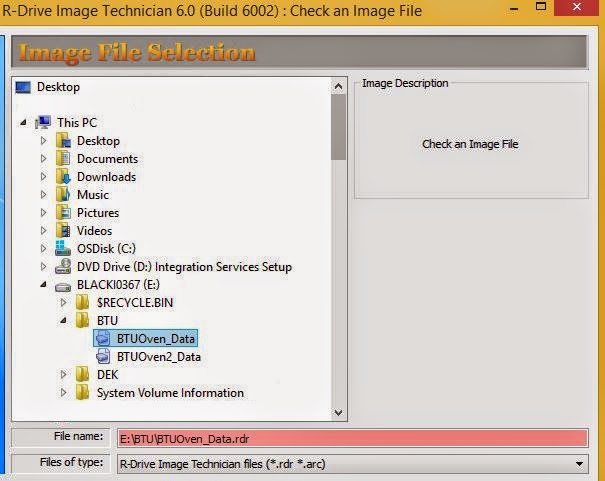
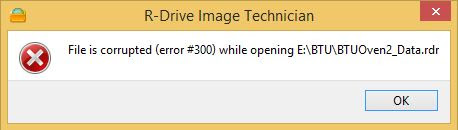
Problem: When I either try to verify or restore the split image, I click on the first file of the split image, and the "File name" fills red with the [Next] button greyed out. However, if I highlight the second file of the split image, then I can click [Next] but it fails, as shown in second image below.
Temporary Fix: By changing the file-name without underscores the image will then allow me to verify and restore.
Again, the underscores do not affect our non-split images. I thought I'd post this in case anyone else is having the same problem.
Background: During a backup of a machine PC, I used a bootable startup disc to offload the image to a FAT32 external drive; this caused the image to automatically split into 4GB files. This is the first image I obtained that has been split as I normally use an NTFS external drive. We use a naming convention with underscores in the image file name. Our naming convention works great for our non-split images but not for split images.
Problem: When I either try to verify or restore the split image, I click on the first file of the split image, and the "File name" fills red with the [Next] button greyed out. However, if I highlight the second file of the split image, then I can click [Next] but it fails, as shown in second image below.
[img]https://lh6.googleusercontent.com/-srQCWe9WY6s/VGzxiHMy-UI/AAAAAAAAAC8/lkhFqgibKW8/w605-h481-no/Error300_RDrive.JPG[/img]
[img]https://lh6.googleusercontent.com/-u-xeIltqHTI/VGzxixNs7zI/AAAAAAAAADE/-OmDnVX5yX8/w458-h130-no/Error300_RDrive_3.JPG[/img]
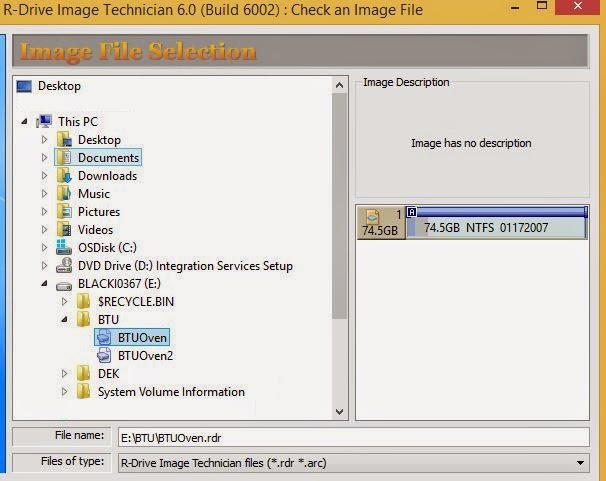
Temporary Fix: By changing the file-name without underscores the image will then allow me to verify and restore.
[img]https://lh6.googleusercontent.com/-asPhg8VGw4E/VGzxj5lqq4I/AAAAAAAAACU/0BalnBOWDV0/w606-h481-no/Error300_RDrive_2.JPG[/img]
Again, the underscores do not affect our non-split images. I thought I'd post this in case anyone else is having the same problem.